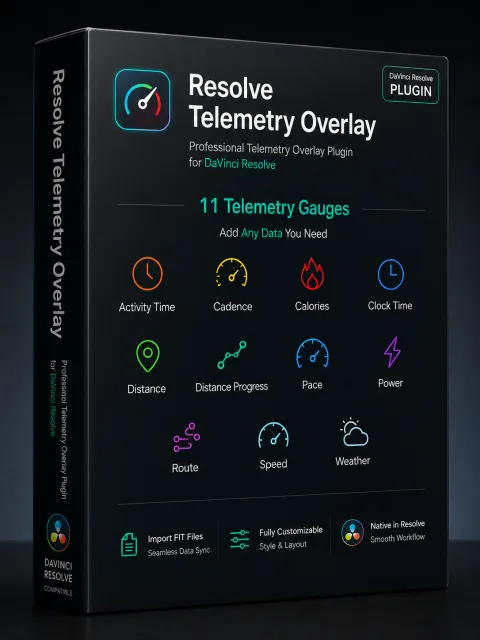
Eleven independent gauges
Combine pace, speed, cadence, power, calories, activity time, distance, route and weather data, keeping only the information your video needs.
Resolve Telemetry Overlay brings FIT data from cycling, running and trail activities directly into DaVinci Resolve. Design, synchronize and combine pace, speed, heart rate, power, route and weather information just like other elements in your footage.

Each gauge is an independent OpenFX Generator. Drag it onto the timeline, then adjust position, color, style and time mapping in the Inspector, using the editing workflow you already know.
Combine pace, speed, cadence, power, calories, activity time, distance, route and weather data, keeping only the information your video needs.
Add a Generator from the Effects Library, preview it on the timeline, and adjust its style, layout and synchronization in the Inspector.
FIT files are read locally and reloaded only when they change. Video and rendered frames are not uploaded, keeping timeline previews responsive.
From importing FIT files to choosing gauges, synchronizing time and finishing the design, every key step happens in DaVinci Resolve.
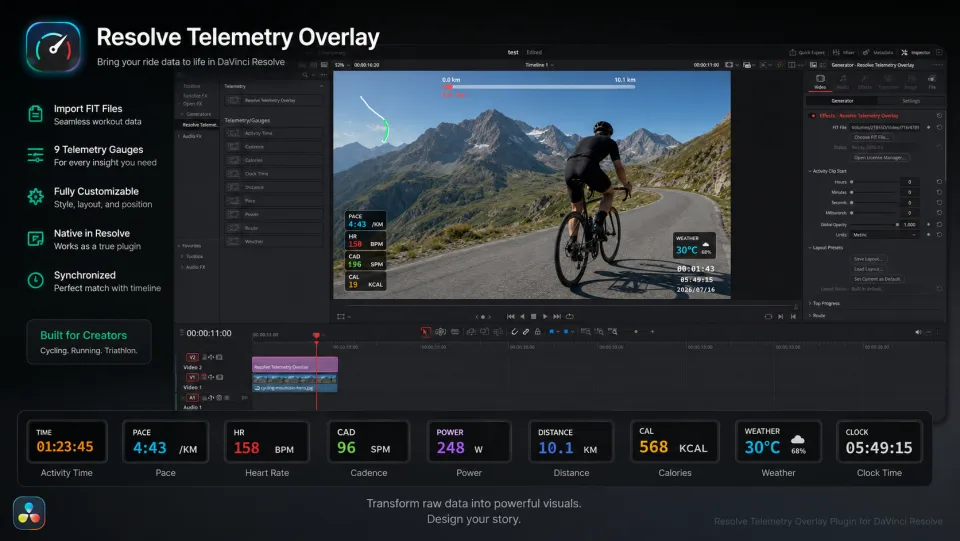
Drag the telemetry gauges you need from the Effects Library onto the DaVinci Resolve timeline.
The plugin reads activity data locally and maps speed, heart rate, power, route and other information to the timeline.
Adjust gauge styles, positions and time mapping in the Inspector, then finish your video using your usual editing workflow.
One purchase covers 2 computers (macOS or Windows) and includes all updates within the current major version. Visit the product website for full pricing, downloads and license details.